Redesigning the Goodfit ATS Pipeline to help hire up to 40% faster

My Role

Product Designer

Project Duration

4 weeks

Domain

HR-Tech

Redesigning the Goodfit ATS Pipeline to help hire up to 40% faster

01

Summary

Goodfit is an AI‑native ATS and talent screening platform. It scores resumes, runs intelligent and conversational AI interviews, proctors coding and psychometric tests, and funnels all of that into a job pipeline where recruiters spend most of their day.

A typical pipeline for a role includes:

  • Resume scoring
  • One or more assessments (coding, psychometric, role‑based)
  • AI interview
  • Human interviews, offer letters, negotiations and hiring.

On paper, everything a recruiter needs exists somewhere: scores, proctoring incidents, tenure history, competitor experience, notice period, and more. In practice, almost none of that lived on the board, so people were stuck in a “open profile → close profile → repeat 40–50 times a day” loop.

02

The Problem

Recruiters kept switching contexts due to low confidence, and that slowed down time-to-hire.

Most of the early signals came in through Microsoft Clarity which I regularly monitor to analyze users. In dozens of recordings, I observed a common pattern — users were spending too long in switching between pipeline and candidate profiles to action candidates. To confirm this, I queried our backend to find out time-to-action and time-to-hire. Used an MCP server connected to the backend, via Claude

Average time-to-hire for 10 companies for 5 different roles came in at 21 days. This wasn't right for a platform that promised faster time to hire.

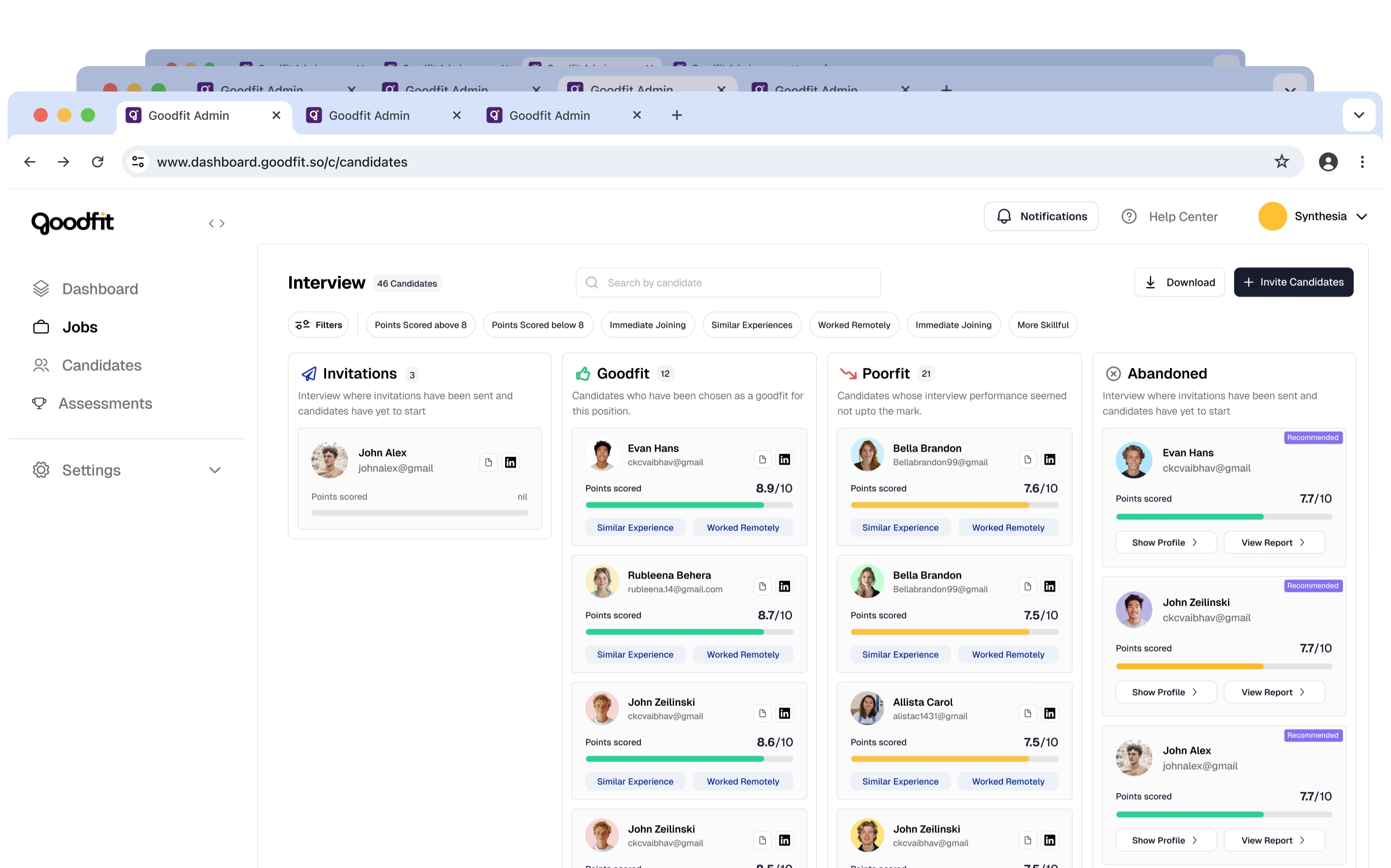
Pipeline problem analysis

We were in regular touch with users, and we ran unmoderated usability testing.

These were some of the common things observed:

  • Users were skimming through full videos of AI interviews to determine if Goodfits were using AI-helpers (like Cluely).
  • Users had to dig for signals such as join dates, domain experience, and so on.
  • Candidates who were rejected or put on hold looked the same as active candidates.
  • Users were required to use a different flow for assessment screening pipeline.

Under those lines were four structural problems:

  1. Active and done candidates looked the same. Candidates who were rejected or put on hold looked the same as active, advancing candidates, and this required users to memorize their status.
  2. Cards were informationally thin. One score sat in the middle of the card with almost zero context that actually helped make a decision. Things like score justification, signals, invite history, were simply not surfaced, even though they're crucial to decisions.
  3. Pipeline had not accommodated assessments: This required recruiters to access a completely separate flow for assessments.
  4. Mismatched candidates could interview: A job has several key, non-negotiable requirements, such as on-site roles requiring candidates who can fulfill that criteria. But we let any person, including those who didn't match this criteria, take an interview.

As a result, recruiters' trust on our platform degraded, and their confidence decreased.

03

Design Goals and Constraints

Real constraints shaped everything:

  • Four‑week timeline for the end-to-end final prototype.
  • Founders and recruiters act as primary partners.
  • Time too constrained to allow for a field research study.

Inside that box, I wrote down one non‑negotiable goal:

A recruiter should be able to make a confident decision on at least 70% of candidates directly from the board, without opening their profiles.

On top of that, I set four guiding principles:

  • Cards would be intelligent decision units.
  • It should be trivial to visually distinguish between active and stale or rejected candidates.
  • Signals beat text explanations.
  • Bulk actions are essential for high‑volume work.

These principles came straight from the quote above and from patterns in strong pipeline case studies that center on clearer decision workflows.

a

Making performance legible

If the board is where decisions happen, vague numbers aren't enough — recruiters need detailed performance insights and feedback.

The ATS was designed when we were an AI-interviews platform. Talent screening and assessments came in later.

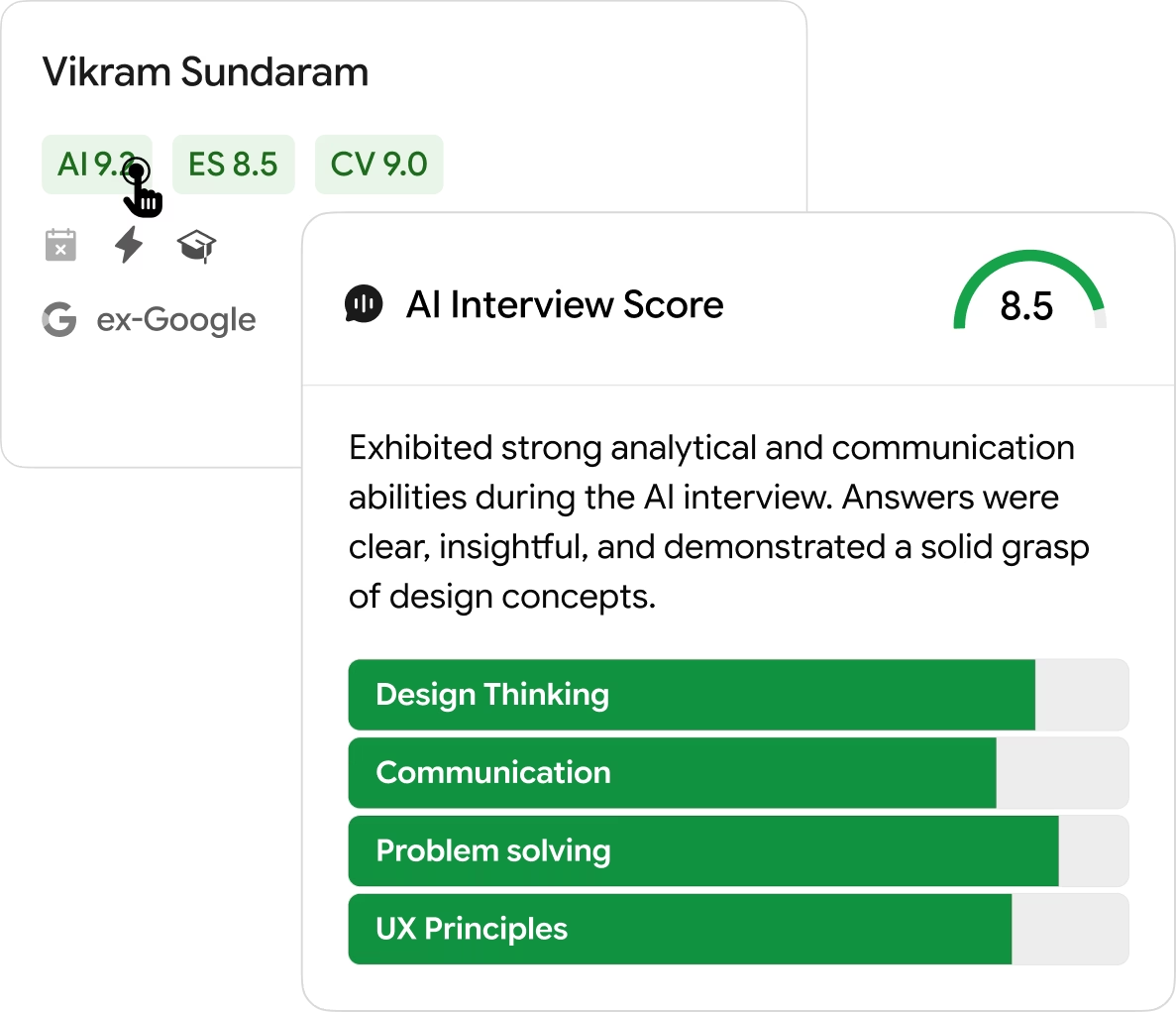
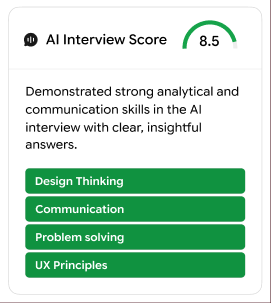
In the redesign, I decided to show all three scores:

  • Resume
  • Assessment
  • AI Interview
Solution: performance legibility redesign

They sit next to each other, semantically colored and visually grouped. That lets recruiters spot patterns fast: “strong resume + strong coding + shaky AI interview” is a different conversation from “weak resume + strong AI interview + no coding signal”.

We also help users understand why scores are assigned, by justifying them and making the justification tooltip appear upon hovering on a score.

b

Invite history as a first‑class signal

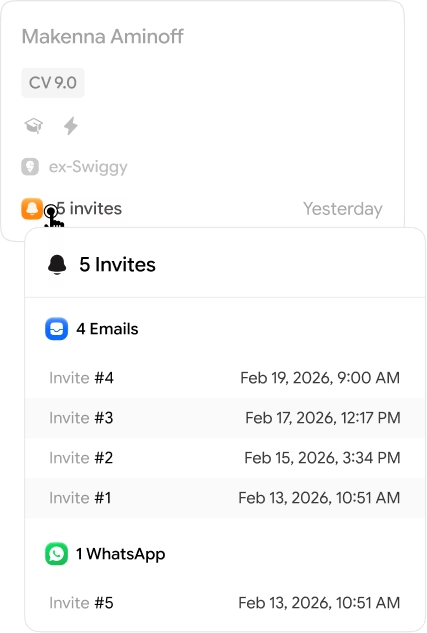
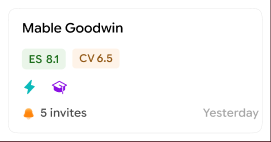
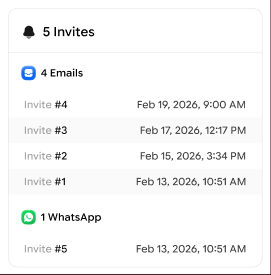
Recruiters often complain about repeatedly sending invites to candidates and not hearing back. This information needed to be present on the pipeline itself, for recruiters to make better decisions factoring in candidate interest.

Invite history surfaced on pipeline card

So, I surfaced the information up top:

  • Number of invites sent
  • Types of invites (WhatsApp or Email)
  • Timestamps of each invite

c

Making candidate status explicit

One quiet source of anxiety in the old board: active and inactive journeys lived in the same visual lane. Recruiters had to keep track in their heads — “this one is still in play, that one is effectively done” — even though the cards looked identical.

I addressed it by adding a simple status label, assignable directly from the card.

Candidate status explicit on card

Simply hover on the card, and configure status of a candidate.

As a result of that:

  • A quick scan of the board now separates people who need a decision from people whose state is already known.
  • Rejected and On Hold candidates stay visible in the pipeline without mixing in with other candidates.

d

Designing a signal bar recruiters can skim

Long labels don't work when a recruiter is staring at hundreds of candidates. They need quick, concrete hints tied to the way they already judge risk and fit.

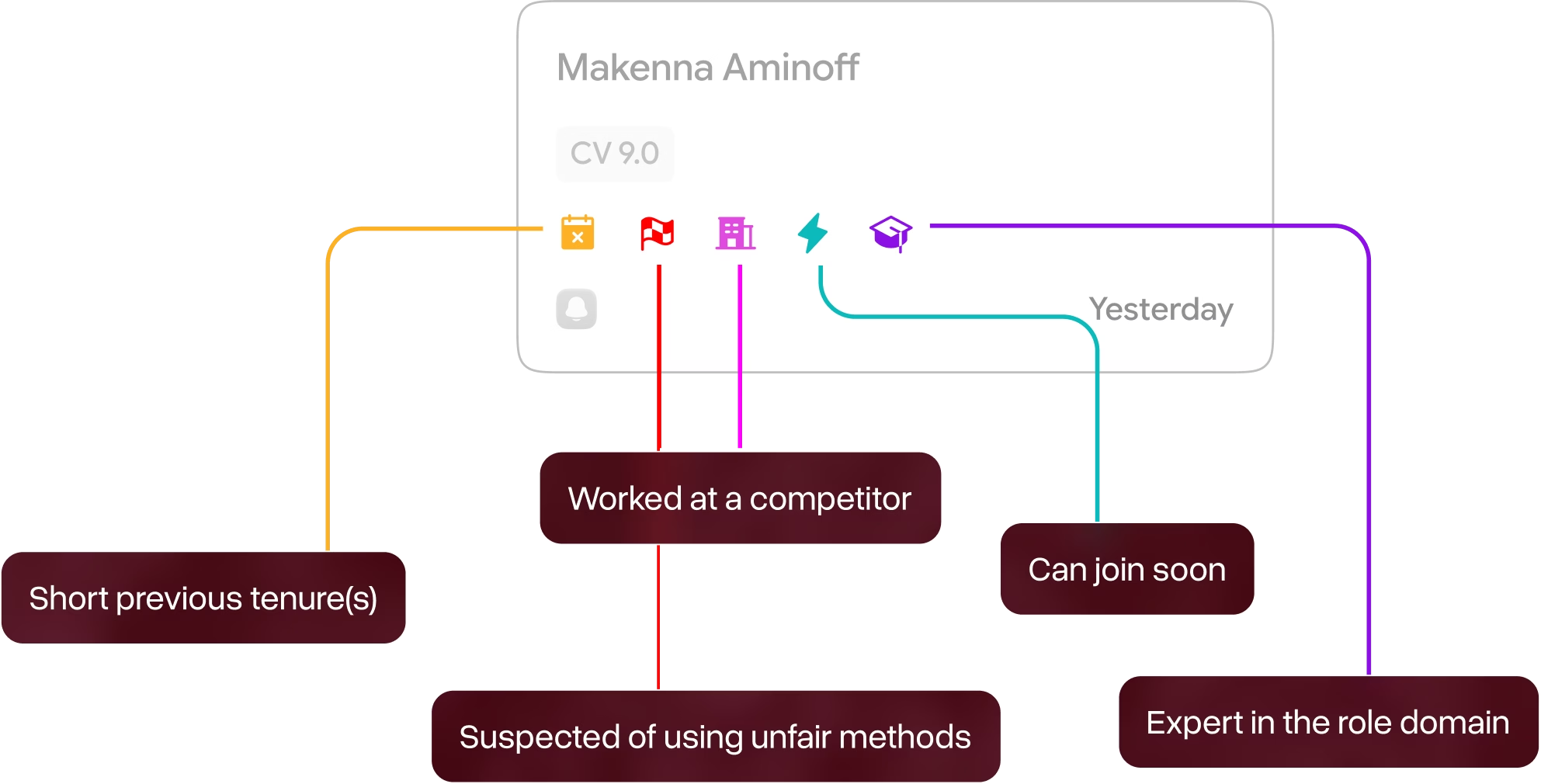
I designed a compact signal bar that lives on every card, anchored in real recruiter heuristics:

Signal bar on candidate cards

Short previous tenure

Suspected of using unfair methods

Worked at a competitor

Can join soon

Expert in the role domain

Signal bar expanded view

05

Designing for Scale

Mockups often show empty or light pipelines. Recruiters don't live there. They live in boards with hundreds or thousands of cards, especially in resume pool and invited stages.

I focused on three things that mature pipelines emphasize in their visual pipelines: clear orientation, prioritization cues, and smooth movement.

a

Staying oriented in heavy boards

To keep the structure legible when the board is packed:

  • Each column uses a pale background with a visible top stroke, so boundaries stay clear even at lower zoom levels.
  • Column headers carry live counts and a short helper line like “Invited — 45”, written to stay readable at common laptop widths.

When you scroll through a dense board, these anchors stop the screen from turning into one undifferentiated grid.

b

Hover that feels intentional

We rely on tooltips to help recruiters surface data such as justification behind scores and signals, details of past work experience at a reputable or preferred company, and details of invites sent.

When I first prototyped the hover effects, there were cases where they activated accidentally. This could've been quite disruptive if users were moving their mouse cursor across the screen and hover unintentionally registered and activated, thus opening tooltips.

In order to address this, I implemented smart delays, where we detect if the user reeealllly intends to open a tooltip. Here's how it works:

When an interactive element is hovered upon, we update its state to indicate an upcoming interaction, and the tooltip shows up after the hover is continuously maintained for 500ms. Once the initial activation is performed, hovers in near proximity activate in near-instant time.

If hover is activated again after a significant gap, it induces the same delay again.

Why this interaction

This will help recruiters intentionally discover and use hover effects to expand upon data. This ensured we never received complaints of accidental hover activations.

c

Making time visible

Silent bottlenecks happen when nobody notices that a set of candidates has been stuck for too long.

I added time in current stage to each card (for example, “4d in Goodfit”), plus subtle warnings once a card crosses a configurable threshold, such as “Awaiting feedback for 7 days” in amber meta text.

Time in stage visible on cards

On top of that, this turns the board into a crude bottleneck detector even before advanced analytics ship, echoing how leading ATS vendors talk about monitoring stage health and time‑to‑advance.

d

Bulk actions that feel obvious

For high‑volume roles, nobody wants to click into 40 profiles just to send the same email or move candidates one by one.

We explored a right‑click context menu for bulk actions — select, email, move stage, ban — then dropped them after tests. It has poor discoverability and recall. And it matched patterns in HR‑tech case studies where hidden interactions trade away usability for visual cleanliness.

The final interaction model:

  • A hover‑to‑surface control strip on each card with core actions: email, move, ban, select.
  • A sticky bulk‑action bar, floating at the bottom of the board that appears once multiple cards are selected, tuned for workflows like “email N candidates” in a few clicks.
Bulk actions floating bar

06

Validating Assumptions

Now that the design was more or less ready, it was time to validate assumptions.

We tested the redesigned pipeline with a company that hires at scale — and they noted substantial performance gains to warrant a full release.

Rejected Ideas

  1. Unified “Goodfit Score” 0–10.

Unified scores look attractive on paper because they “seem” to decrease the number of variables needed for making decisions, but recruiters didn't like this approach because it took away granular data which allows for clearer decisions.

  1. Signals as emojis

I experimented with pure emoji (🔥, 🚩, etc.) to feel lighter. Emojis typically never make the cut because they have poor recall, and, honestly, are quite unserious to begin with.

  1. Logically saturated scores

In order to gently nudge recruiters' focus towards the most important profiles — ones with higher overall scores and no red flags, we made their score pills more saturated.

Recruiters didn't like it because it drew unnecessary attention, and hiring is more nuanced than just these signals.

  1. Statuses as columns

We created two extra columns to exclusively house Rejected and On Hold candidates. It was immediately met with friction, because only a stage deserves its own column. Moreover, in these columns, it was not clearly signaled which stage the listed candidates came from, which is an important contextual clue.

  1. Dedicated skills row

We tried a row dedicated to just showing skills. This was ultimately scrapped, because it would overcrowd the board with less impactful data, and cause technical issues, including increased load times of the overall board.

07

How I worked

On paper, this was a four‑week redesign. In reality it was a tight loop between the whiteboard, Figma, Mobbin, Slack, and live calls.

Here's a rough outline of my process —

Week 1 — Insights and alignment

I paused incremental changes, did a structured pass over the existing board, and mapped concrete failure points: where trust broke, where a profile open became mandatory, where active and done candidates mixed.

On top of that, I aligned with founders and senior designers from our parent on constraints and wrote down the “decide from the board” goal to keep scope honest.

Week 2 — Card structure, scores and signals

I made initial designs in Figma Design, then switched to Figma Make (AI prototyping tool) to rapidly prototype different iterations of the card. At this stage, the card housed name, scores, signals and age. I battle-tested the prototypes against real-life scenarios, such as “show me a strong engineer who performed poorly in the AI interview; what do I see on the card?”. We used those scenarios in reviews, and ultimately advanced the current iteration.

Week 3 — Expanding on data

I added invite counts, bulk actions, filters, and a way to surface candidates from preferred companies, along with email templates and blacklist/ban functionality. Through the process, I explored and pruned multiple design variants, introduced dedicated On Hold and Rejected menus, and iterated on different bulk-action concepts.

Week 4 — States, copy, and handoff

I tightened microcopy on scores and signals, smoothed hover/tap behavior for just‑in‑time justifications, and defined edge states for time‑in‑stage and invite history.

08

Impact once the board went live

When the redesigned board was tested with an initial cohort of customers, we saw three clear shifts:

  • Roughly 40% reduction in time‑to‑hire on roles where the pipeline was the primary triage surface, compared to historical baselines on the legacy board.
  • Fewer profile opens per decision, especially in mid‑funnel stages like Goodfit / Poorfit.
  • Recruiters observed bulk moving / triaging candidates more frequently without second guessing their decisions or frequently opening candidate profiles.

The metrics aren't lab‑grade; startup analytics rarely are. I treated them as directional and backed them with behavioral signs HR‑tech teams care about: time-to-hire reduced to ~12 days, significantly decreased complaints about trust and confidence, quieter support channels around “too many tabs”, fewer complaints about “having to switch back and forth between pipeline and profile.”

09

What I'd do next

If I had another cycle on this surface, I'd push into three areas:

  • Cross‑job insights. Map where similar roles see drop‑offs across jobs and which combinations of signals correlate with offer acceptance, instead of treating each board in isolation.
  • Saved views that match real questions. Let teams pin their own slices like “stuck in Invited for 7+ days”, “high score, low attention candidates”, or “needs feedback from hiring manager”. That mirrors how mature ATS tools expose custom pipeline views for different roles.
  • Stage health analytics. Wrap time‑in‑stage and conversions into simple labels like Healthy / Warning / Critical per stage, aligning with how Greenhouse and others talk about pipeline health.
  • Explore more ways to surface data. Currently, there is some reliance on hover effects to discover tools and data. I would like to explore different layouts to address this.

a

Why this project matters for me as a product designer

I had about one and a half years of product design experience when I took this on. It wasn't a clean lab exercise. It was a fast, constraint‑heavy change to the screen recruiters live in all day.

What this project shows, to recruiters, PMs, and design leadership, is that I can:

  • Start from the way people actually talk about their work (“I have 20 tabs open”, “I can't trust this 7.6”) instead of abstract “pain points”.
  • Turn that into one sharp goal — “decide from the board or don't ship” — rather than a vague “better UX”.
  • Make and defend concrete design moves: segmented scores, readable signals, explicit lanes for paused and rejected candidates, and sensible bulk actions.
  • Tie those moves back to outcomes your team cares about: faster decisions, fewer context switches, higher trust in what the product is telling you.
Final redesign screenshot 1
Final redesign screenshot 2
Final redesign screenshot 3
© PRATYAKSH MEHROTRA, 2026 CCU